
Practical Tips For Making Websites Accessible In California
Website accessibility is not a side task anymore. It is part of good web design, good customer service, and good risk management. In California, it matters even more because businesses are expected to give people with disabilities equal access to online services. Federal ADA guidance says businesses open to the public must make sure their online goods, services, and programs are accessible, and digital accessibility compliance California is an important part of meeting these expectations, while California state accessibility materials point to WCAG 2.2 Level AA and the Unruh Civil Rights Act as key standards in this space.
That can sound complicated at first. It does not have to be. The best way to think about creating accessible websites is simple: can real people use your site with a keyboard, screen reader, captions, clear text, and enough visual contrast? If the answer is no, there is work to do. WCAG 2.2 is built around four main ideas: content should be perceivable, operable, understandable, and robust.
Those ideas are a practical guide for anyone who wants to know how to make a website accessible in California.
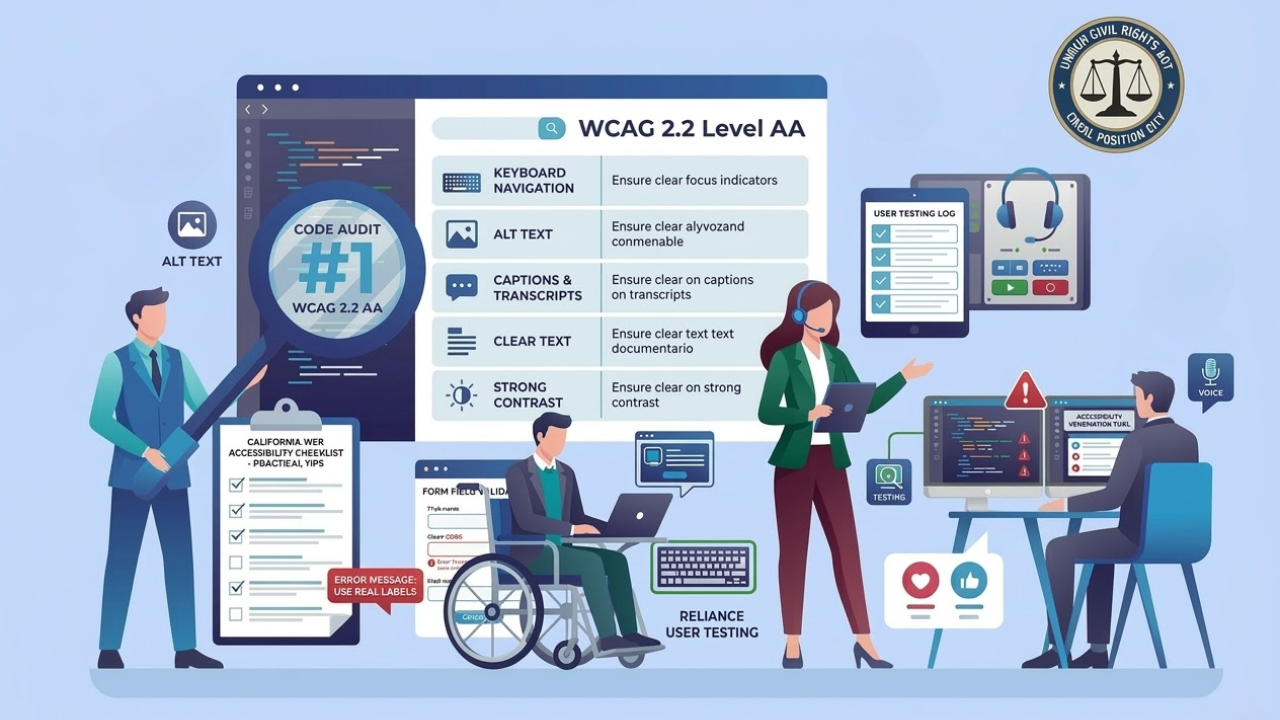
1. Start With The Basics
Many website owners overthink accessibility. They look for a quick tool or a single plugin. But making a website accessible starts with the simple basics.
Check these first:
Can users move through the site with only a keyboard?
Do images have useful alt text?
Do videos have captions?
Is the text easy to read?
Is the color contrast strong enough?
Are buttons and links clear?
Do forms show labels and errors clearly?
These basics matter because inaccessible design creates barriers in the same way stairs can block access to a building. The U.S. Department of Justice says websites can create unnecessary barriers that make it hard or impossible for people with disabilities to use online services.
2. Use WCAG 2.2 As Your Working Standard
If you want a clear path, use web content accessibility guidelines (WCAG 2.2) as your working standard. WCAG 2.2 is the main technical guide for accessible websites. It covers a wide range of disabilities, devices, and situations, and it helps make content more usable for everyone, not only disabled users. California state accessibility materials also reference WCAG 2.2 Level AA as the minimum target for public-facing digital services.
This does not mean you need to memorize the full document. It means you should build your site around a few habits:
Write clear page titles
Use headings in the right order
Make all controls reachable by keyboard
Give links clear names
Add captions and transcripts
Keep forms simple
Give users enough time to act
Avoid confusing layouts
These are some of the most useful accessibility tips because they improve both compliance and everyday usability.
3. Make Keyboard Navigation A Priority
A lot of people use a keyboard instead of a mouse. Some cannot use a mouse at
all. That is why keyboard access is one of the first things to test when making a website accessible.
Try your own site using only the Tab, Enter, Space, and arrow keys. You should be able to:
Open menus
Move through links
Use forms
Select filters
Submit buttons
See where the focus is on the page
If focus disappears or gets trapped, users can get stuck. WCAG 2.2 keeps strong attention on keyboard access and focus visibility because these issues affect real users every day.
4. Write Content That Is Easy To Understand
Accessibility is not only about code. It is also about words. Clear writing helps people with cognitive disabilities, people using translation tools, and people who are simply in a hurry.
Use these rules:
Keep sentences short
Use plain words
Break up long sections
Add helpful headings
Avoid vague link text like “click here.”
Explain what a form needs before the user submits it
This is one of the easiest ways to increase accessibility without changing your whole website. Good writing helps more people finish tasks, understand services, and trust what they are reading.
5. Fix Images, Video, And Audio Content
Media is often where accessibility breaks down. A beautiful site can still fail users if key information lives inside images, videos, or audio with no accessible support.
Here is what to do:
Add alt text to important images
Mark decorative images so screen readers can ignore them
Add captions to videos
Provide transcripts for audio
Do not use images of text unless necessary
The ADA guidance specifically mentions aids and services, such as captions, as part of effective communication. That means accessible media is not optional for public-facing business content.
6. Make Forms Easier To Complete
Forms are one of the biggest problem areas on business websites. They are also where users often make contact, request quotes, book appointments, or complete purchases.
To make forms more accessible:
Use real labels, not only placeholder text
Group related fields clearly
Show required fields in a simple way
Explain errors in plain language
Tell users how to fix each error
Make sure screen readers can read error messages
When people talk about the most accessible websites, they often mean sites where users can complete tasks without guessing. Clear forms are a big part of that.
7. Test With Real Tools And Real People
Automated tools help, but they do not catch everything. W3C explains that WCAG is meant to be tested with both automated accessibility testing and human evaluation. That is important because tools may find missing alt text or contrast issues, but they may miss confusing labels, poor focus order, or unclear instructions.
A practical testing process should include:
Automated scanning
Manual keyboard testing
Screen reader checks
Mobile testing
Review by people who understand accessibility
Ongoing checks after updates
This is where many teams improve their process for creating accessible websites. They stop treating accessibility as a one-time fix and start treating it as part of regular website care.
Think About California Risk And Responsibility
California businesses should take this seriously. State accessibility pages point to WCAG 2.2 Level AA, the ADA, and the Unruh Civil Rights Act. Inclusive Web’s California page also notes that businesses in California can face ADA and Unruh Act claims if websites are not accessible.
So when people ask how to make a website accessible, the answer is not only “because it is nice to do.” It is also because access matters legally, socially, and commercially. A website should work for all customers, including users with disabilities.
Build Accessibility Into Daily Work
The best long-term plan is to build accessibility into design, content, and development from the start. That means checking templates before launch, training content editors, reviewing new pages, and retesting after changes.
A simple team checklist can help:
Use accessible templates
Review headings before publishing
Add alt text every time
Check contrast before approval
Test forms after edits
Caption every new video
Run regular audits
That is the easiest way to keep accessible websites accessible over time.
Conclusion
Accessibility in California is not about chasing perfection. It is about removing barriers step by step. If you focus on keyboard use, clear writing, accessible media, better forms, and regular testing, you will make real progress. That is what making a website accessible looks like in practice.
At Inclusive Web, we focus on audits, remediation, and ongoing monitoring around California accessibility needs.
Have Questions?
We Are Inclusive Web
We work with our clients to simplify digital accessibility to ensure your web and digital applications are ADA compliant and accessible to all your users. If you’d like to talk about your digital accessibility, you can email us at matthew@inclusiveweb.co, leave us a note here, or schedule a call here to discuss. Let’s make the web inclusive to all!