
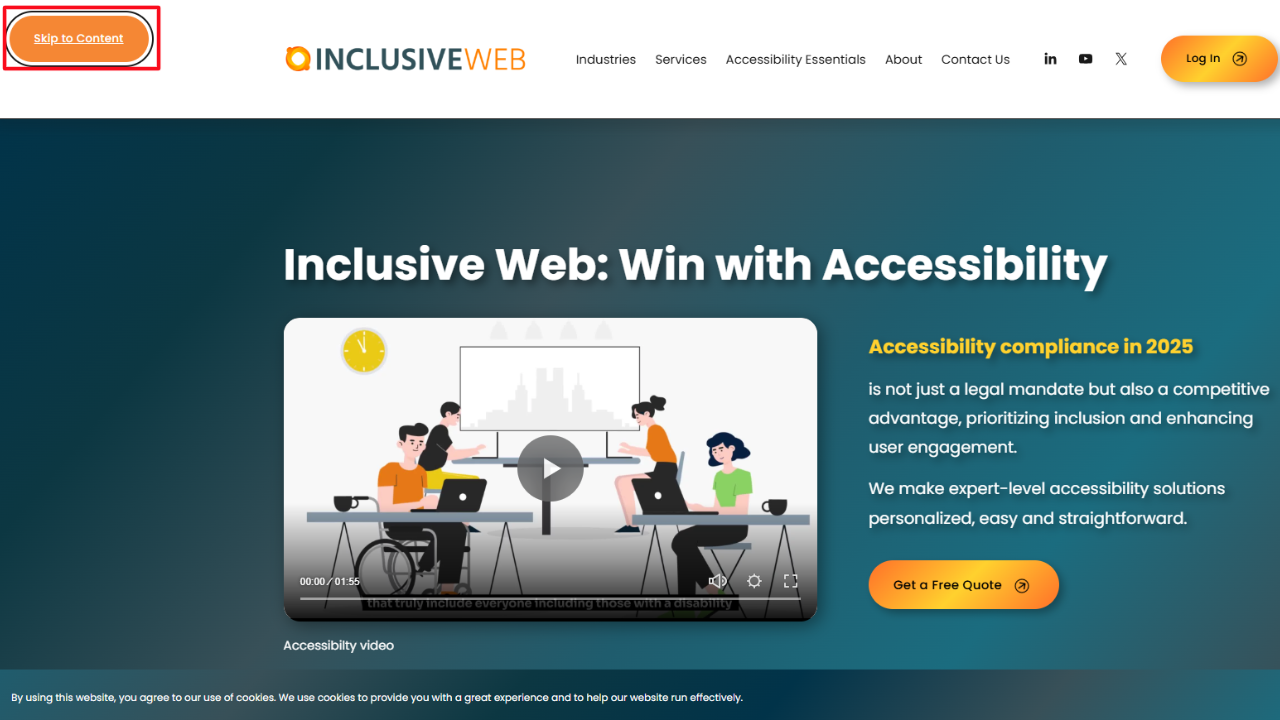
Skip to Main Content Links: A Simple Step Toward Better Accessibility
When you open a website, you probably scroll or click without thinking much about it. You see the menu, you ignore it, and you go straight to what you want, so it feels easy.
But that is not how everyone experiences a website.
Some people do not use a mouse at all. They move through a page using a keyboard. Some people cannot see the screen and rely on a screen reader to read the page out loud. For them, a website feels very different. which is why regular accessibility monitoring is important to understand how real users interact with your content.
Every menu item, every link, every button is reached one at a time.
If a page has an extended header with many links, they must go through all of it before they reach the actual content.
This is where skip to main content links matter. They solve a real problem in an effortless way.
What Is a Skip to Main Content Link?
Let’s keep this simple.
A skip to main content link is a link placed at the top of a page. Its only job is to help users skip past repeated sections and land directly on the main content.
That’s it.
It usually shows up when someone presses the Tab key for the first time. Mouse users rarely notice it, but keyboard users depend on it.
What it helps users do
Skip menus they have already seen
Avoid repeating the same steps on every page
Reach the actual content faster
What it does not do
It does not change your design
It does not affect scrolling
It does not confuse regular users
Think of it as a polite shortcut.
Who Benefits from Skip Links and Why
People often think accessibility features help only a few users. That is not true here.
Keyboard users
If you use a keyboard, you move forward using the Tab key. Without skip links, you may need to press Tab many times before reaching the content.
That gets tiring.
Skip links let you move on with one action instead of many.
Screen reader users
Screen readers read everything in order. Menus can be long. Hearing the same menu on every page slows people down.
Skip links let screen reader users move past repeated content and focus on what changed.
People who want speed
Some users know exactly what they want. They do not want to hear or see the same navigation again. Skip links allow a quick jump directly to a specific section.
This is why skip links are helpful to more people than most teams expect.
How Skip Links Improve Website Accessibility
Accessibility often sounds complicated, but skip links are not.
They improve accessibility by removing unnecessary effort.
Without skip links
Keyboard users press Tab again and again
Screen readers repeat the duplicate content
Users feel stuck before they even start
With skip links
Users reach content faster
Navigation feels predictable
The site feels respectful of time and energy
This is one of the easiest ways to enhance keyboard navigation by implementing skip navigation links that work with how people actually browse.
Common Problems Users Face Without Skip Links
When skip links are missing, the problems are minor but constant.
Too much repetition
Menus appear on every page. Without skip links, users must move through them every time.
Physical and mental fatigue
Pressing keys again and again is tiring. Listening to repeated content is tiring.
Confusion
When everything comes in a long line, it is harder to understand where the real content begins.
None of this feels dramatic, but it just doesn't feel enjoyable. Over time, people stop using the site.
How Skip to Main Content Links Work in Practice
Skip links are simple. There is no trick.
They are just links that point to another part of the same page.
What happens step by step
The page loads
The user presses Tab
The skip link appears
The user activates it
Focus moves to the main content
That is all.
Some sites also include options like skip to navigation, but skip to main content is the most important one.
Where Skip Links Should Be Placed on a Website
Placement matters more than styling.
Where should they go
Right at the top of the page
Before the navigation menu
As the first thing a keyboard user reaches
Where they should not go
After the navigation
Hidden behind many other elements
Placed where users must already struggle to reach them
If a skip link is hard to reach, it fails its purpose.
Design Best Practices for Visible and Hidden Skip Links
Many designers worry about how skip links look. That concern is understandable.
The good news is that there is a simple solution.
A common and accepted approach
Hide the skip link visually
Show it when it receives keyboard focus
What matters for design
Text should be clear, like “Skip to main content.”
When visible, it should be easy to read
Contrast should be strong enough
What to avoid
Hiding it completely
Removing it from keyboard focus
Making it unreadable
Hidden should never mean unreachable.
Keyboard Navigation and Focus Management Explained
To understand skip links, you need to understand focus.
Focus is how a keyboard user knows where they are on a page. When they press Tab, focus moves.
Skip links work by moving focus to a new place.
Important details
The target section must accept focus
Focus should land at the start of the content
The movement should feel expected, not surprising
Often, this means adding a small attribute to the main content area. Without this, the skip link may not work correctly.
Skip Links and WCAG Accessibility Requirements
Skip links are not just helpful. They connect directly to Web Content accessibility guidelines. WCAG requires a way to bypass repeated blocks of content. Skip links are the most common way to meet that requirement.
They support:
Keyboard access
Clear navigation
Predictable interaction
They are also easy to test, which makes them practical.
Common Mistakes When Implementing Skip Links
Skip links are easy to get wrong in small ways.
Common issues
The link exists, but cannot be focused
The target area does not receive focus
The link text is unclear
The link appears too late
Each of these creates frustration. Users try the feature and feel disappointed when nothing happens.
How to Test Skip to Main Content Links
You do not need special tools.
Keyboard test
Load the page
Press Tab
Look for the skip link
Activate it
Check where focus lands
Screen reader check
Listen to how the link is announced
Make sure it makes sense
Confirm the content reads correctly after skipping
If it feels smooth, it probably works.
Real-World Examples of Good Skip Link Implementation
Many public websites do this well. Government sites often include clear skip links because they serve many users with different needs. Educational and service-based sites also tend to get this right. especially when they focus on the accessibility of education for students, parents, and staff using different devices and assistive technologies.
In good examples, skip links are not flashy but are quiet and reliable.
Why Skip Links Are One of the Easiest Accessibility Wins
Some accessibility improvements take a lot of time. Skip links do not require little code and do not change the design. They help immediately.
They are often missed because teams forget to test with a keyboard. Once you do, their value becomes obvious.
Final Thoughts: Small Changes That Make a Big Difference
Accessibility does not start with big promises. It starts with small, thoughtful choices.
Skip to main content links are one of those choices. They save time. They reduce frustration. They show that you considered how real people move through your site.
For teams like Inclusive Web, focusing on simple fixes like this helps create websites that feel welcoming instead of tiring.
What this really means is simple. When you design for how people actually use the web, not just how it looks, everyone benefits.
FAQs
Do skip links affect normal users?
No. Most mouse users never see them.
Are skip links required?
They are one of the simplest ways to meet accessibility rules for bypassing repeated content.
Can you have more than one skip link?
Yes. Some sites include skip to navigation or skip to search, but skip to main content is the most important.
Are skip links hard to maintain?
No. Once set up correctly, they usually just work.
Have Questions?

We Are Inclusive Web
We work with our clients to simplify digital accessibility to ensure your web and digital applications are ADA compliant and accessible to all your users. If you’d like to talk about your digital accessibility, you can email us at matthew@inclusiveweb.co, leave us a note here, or schedule a call here to discuss. Let’s make the web inclusive to all!