
Common Mistakes in Accessibility User Testing and How to Avoid Them
You know what's frustrating? Building a website that accidentally locks people out.
It happens more than you'd think. Companies spend months creating websites, but then they skip proper accessibility user testing. The result? Millions of people can't use what you made.
Testing for accessibility sounds straightforward. But teams make the same mistakes over and over. Let's talk about what goes wrong and how you can do better.
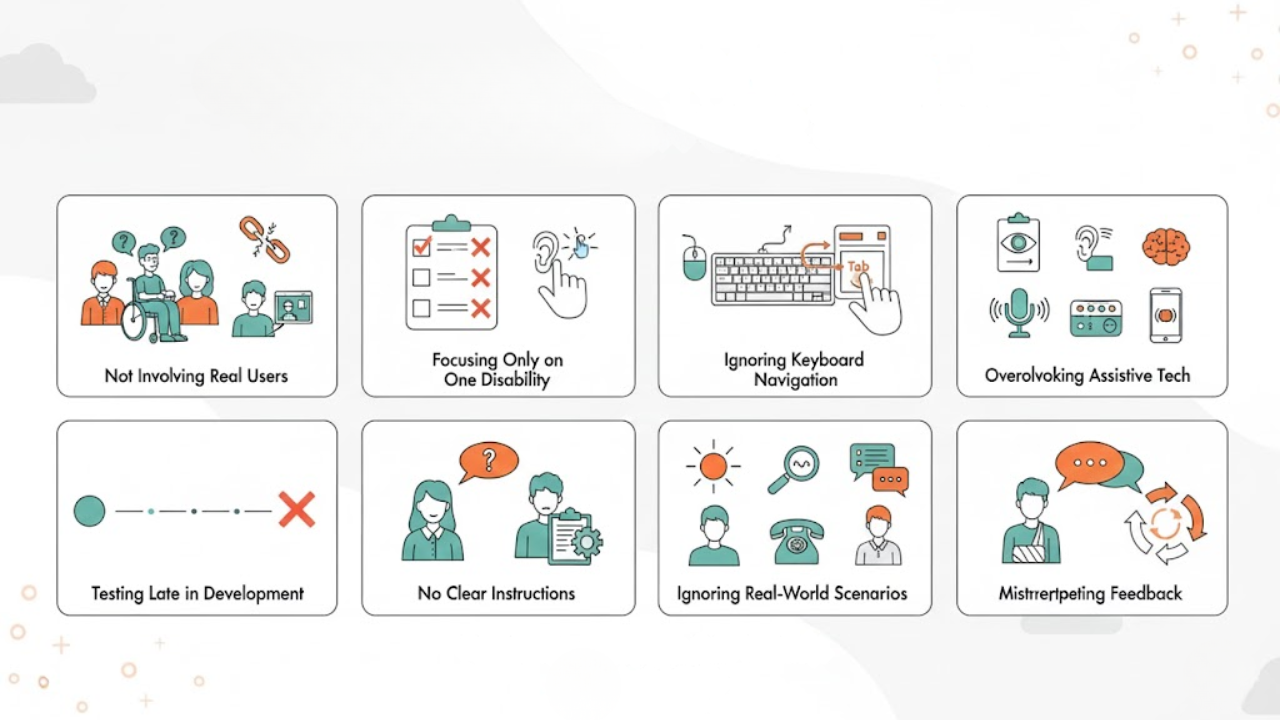
1. Not Involving Real Users with Disabilities
Here's where most teams mess up right from the start.
They run automated accessibility testing. Someone on the team tries using a screen reader for five minutes. They check a few boxes and move on. Problem solved, right?
Wrong.
You can't understand what it's like to navigate a website with a disability unless you actually have one. It's like trying to review a restaurant without eating the food.
People who use assistive technology every day know things you don't. They've spent years dealing with website accessibility issues. They know which problems are annoying and which ones completely stop them from getting anything done.
What you should do instead:
Find real people with disabilities to test your website. Look for screen reader users, people who only use keyboards, folks with motor challenges, and anyone with cognitive differences.
Pay them, as their time and expertise matters. Treating this like volunteer work sends the wrong message.
Start looking for testers early. Don't wait until your site is almost done. Connect with disability organizations now.
2. Focusing Only on One Type of Disability
Some websites work great for blind users but are terrible for everyone else.
Maybe you tested everything with screen readers. You feel pretty good about it. But you forgot about people who can't use a mouse. Or people with hearing loss. Or those who process information differently.
When you only test for one disability, you create new problems while fixing old ones. Your website becomes a game of whack-a-mole with accessibility barriers.
What you should do instead:
Make a testing checklist that covers different needs. Include vision problems, hearing issues, motor disabilities, and cognitive challenges.
Remember that disabilities often overlap. Someone might use both a screen reader and voice commands. Another person might have both vision and cognitive differences.
Go beyond screen readers. Test with voice control software, switch devices, and screen magnifiers too.
3. Ignoring Keyboard-Only Navigation
Lots of people never touch a mouse. They navigate websites entirely through keyboard keys.
But countless sites trap these users in menus. Focus indicators disappear. Buttons can't be reached. These aren't minor usability issues in website design. They're walls that block access entirely.
If you only test with a mouse, you'll never see these problems. Your site will seem fine while being totally broken for keyboard users. One of the key accessibility tests is often overlooked.
What you should do instead:
Stop using your mouse during tests. Actually, unplug it.
Hit the Tab key to move through everything on your pages. Can you see where you are? Can you reach every button and link? Can you get out of pop-up windows?
Try finishing real tasks without your mouse. Fill out a form. Search for something. Buy a product. If you get stuck or annoyed, your users will feel the same way.
Watch out for custom widgets. Dropdown menus and image sliders often create keyboard traps.
4. Overlooking Assistive Technologies
Screen readers get all the attention. But people use way more tools than that.
Some folks zoom in on parts of the screen. Others control everything with their voice. Some change how text looks to read better. Some people use special switches to click things.
When you ignore these tools, you miss common usability problems that affect how real people use your site.
What you should do instead:
Test with more than just NVDA and JAWS. Try ZoomText for magnification. Use Dragon for voice control. Check out tools that help with reading.
Test on different devices too. Mac users depend on VoiceOver. Phone users have TalkBack on Android or VoiceOver on iPhone. Each one works differently.
Watch experienced users with their own tools. Your quick test can't match someone who uses this stuff every single day.
Write down which tools you tested. This helps users know what works and helps your team track what's covered.
5. Testing Late in the Development Cycle
Finding accessibility problems after you build everything is expensive and annoying.
Many teams think of accessibility as the last step before launch. They build the whole site, then ask people with disabilities to test it. By then, big structural problems cost too much to fix.
This creates stress. Developers need to ship on time. Accessibility fixes look like extra work. Users with disabilities seem like roadblocks instead of helpful guides.
What you should do instead:
Start testing during design. Show early sketches to users with disabilities. Get thoughts on layout and navigation before writing any code.
Test as you build. Don't wait until everything's finished. Check components and features while you're making them so you catch issues early.
Make accessibility part of being done. A feature isn't complete until it works for everyone and accessibility errors are fixed.
Keep testers available throughout your project, not just at the end.
6. Not Providing Clear Instructions and Feedback
Testing needs structure but also freedom. Getting that balance right is tricky.
Some teams give zero guidance. They sit users down and say, "Look around." People waste time wondering what they're supposed to do.
Other teams script everything too much. They give step-by-step directions that hide how people would naturally use the site. You missed real problems because you controlled the test too tightly.
What you should do instead:
Give users tasks, but let them explore naturally. Say "find the shipping costs" instead of "click the footer link that says Shipping."
Ask people to talk while they work. Hearing their thoughts shows problems you might miss just by watching.
Take notes on everything, but don't get defensive. When users struggle, accept it. Don't make excuses.
Ask open questions afterward. What frustrated them? What worked? What would they change? Sometimes the best insights come after the formal test ends.
Make people comfortable being honest. If they think you only want good news, they'll hold back vital information.
7. Ignoring Real-World Scenarios
Testing in perfect conditions doesn't match real life.
Real users are tired, distracted, or stressed. They use old browsers or outdated tools. They're on slow internet or trying to see their screen in bright sunlight.
Testing only in ideal situations means missing problems that happen every day. Your site works in the lab but fails in actual use.
What you should do instead:
Test in different conditions. Try your site in various lighting. Use older devices. Slow down your internet connection.
Think about where people are. Can your site work in a noisy cafe where audio is hard to hear? Does it work in a quiet library where voice commands aren't possible?
Ask testers to use your site at home with their own equipment. Their personal setup often shows issues that your testing computers don't.
Test at different times. People get tired. Something clear in the morning might confuse them at night.
Don't forget temporary disabilities. Someone with a broken arm, a parent holding a baby, or a person with a headache faces accessibility challenges, too. This is why testing with disabled users is Important.
8. Misinterpreting or Ignoring Feedback
Collecting feedback means nothing if you don't use it right.
Sometimes developers think users are doing things wrong when they struggle. They explain how the feature should work instead of accepting that it doesn't work for users.
Other times, teams only listen to feedback they already agree with. They ignore criticism. Or they make changes that sound good but don't fix the actual problem.
What you should do instead:
Listen without defending. When users report problems, believe them. Their experience counts even if you don't get it yet.
Look for patterns. One person struggling might be random, but several users hitting the same wall means a real problem exists.
Find the root cause. A user might say, "I can't find the search button," but the real issue could be poor layout or confusing icons.
Fix critical barriers first before polishing small details.
Share what you learned with everyone on your team. Accessibility isn't just one person's job. Everyone needs to understand how their choices affect users.
Show testers what you fixed based on their input. Prove you valued what they said.
Conclusion
Accessibility testing isn't something you do once and forget.
All these mistakes share something in common. They put distance between you and the people using your website. They let you avoid hard truths about how your design affects real people.
Avoiding these mistakes takes humility. You have to admit you don't know everything. You have to listen more than you talk. You have to invest time in understanding experiences different from yours.
But here's what you get back: websites that work for everyone usually work better for everyone. Clear navigation helps all users. Fast loading helps all users. Simple language reaches more people.
Companies like Inclusive Web get that accessibility is about people, not just rules. When you put user needs at the center of testing, you create digital spaces that welcome everyone.
Start small if that helps. Include one user with disabilities in your next project. Test one page using only your keyboard. Build from there.
Your website exists for people. Your testing should include those people.
Have Questions?
We Are Inclusive Web
We work with our clients to simplify digital accessibility to ensure your web and digital applications are ADA compliant and accessible to all your users. If you’d like to talk about your digital accessibility, you can email us at matthew@inclusiveweb.co, leave us a note here, or schedule a call here to discuss. Let’s make the web inclusive to all!